

Archiving
What is Archiving?
Youtrust offers a legal electronic archiving service through its partner Arkhineo (an NF 461 certified EAS), a certified third-party archiver.
With this service, you can archive your files in a secure digital safe for 10 years (from the date of archiving).
The Archiving feature is an add-on to your Youtrust subscription. Make sure it is activated for your account.
This feature can be used in two different ways:
- you can directly archive a file from the API,
- or you can set an option on a Signature Request to automatically archive the documents once the Signature Request is completed
Archive a file
You can archive a file directly in a secure digital safe with the archives endpoint:
POST /archives
curl --location --request POST '{baseUrl}/archives' \
--header 'Authorization: Bearer {apiKey}' \
--header 'Accept: application/json' \
--header 'Content-Type: multipart/form-data' \
--form 'file=@"/path/to/the/document/sample_document_archive.pdf"'
{
"id": "f6624a42-cbcf-4d68-b315-6bf883190de8",
"sha256": "6ecf29381314217530c02c64a97050a0a6a0944bb974b6b417588277e289aef0",
"filename": "sample_document_archive.pdf",
"created_at": "2024-07-26T08:10:17+00:00",
"expired_at": "2025-01-01T08:10:17+00:00",
"content_type": "application/pdf",
"size": 123456,
"tags": [
"ref-order-HEY1337",
"ref-customer-YS42"
],
"archive_y_identifier": "e32aff82-eae7-40d2-bb19-4d425c3b6780",
"workspace_id": "1f3a8e7a-3948-4680-b306-75cd1b49e761"
}| Query Param | Type | Description |
|---|---|---|
| file | file | The file you want to archive. Limit: 50 Mo |
| expired_at | date | Even if your archive is stored for 10 years, it’s possible to define an end of life date before these 10 years. The price remains unchanged but this feature allows you to better control the retention time of your data. |
| tags | array of strings | The tags are used to easily locate your archive with your internal keywords (reference, purchase order, …). |
| archive_y | boolean | This feature is very specific and allows you to archive a document in different secure spaces with our third-party archiving partner. For this service, it's necessary to contact our Sales team beforehand. |
| workspace_id | string | If you have several Workspaces within your organization, you can attach the id of one of those Workspaces to closely monitor your archives consumption. |
Please note that you’ll need theid value found in the response to be able to download an archived file.
Archive all documents of a Signature Request
You can activate the Archiving option when initiating a new Signature Request (see API reference). If activated, all the documents (signed documents, attachments) will be automatically archived in a secure digital safe once the Signature Request is completed.
To activate the option, you must add the archiving parameter to the payload when you initiate the Signature Request. This parameter can take 3 values:
| Value | Description |
|---|---|
| null | [default value] The documents of the Signature Request won’t be archived. |
| archive | The documents of the Signature Request will be archived in a secure digital safe. |
| archiveY | This feature is very specific and allows you to archive a document in two different secure spaces. For this service, it's necessary to contact our Sales team beforehand. |
POST /signature_requests
{
     "name": "signature request name",
     "delivery_mode": "none",
     "signers_allowed_to_decline": false,
     "archiving": "archive"
}The
archivingparameter is flagged as deprecated in the API reference as this service is only available for specific customers.
Configure the Y archiving vault per Workspace
The Y archiving vault identifier (archiving: archive_y) can be configured at Organization level and at Workspace level, so that each Workspace archives into its own vault.
For a Signature Request, the vault is resolved on the Workspace of the request, then on the Organization as a fallback. For a file sent through Direct upload an archived file, an explicit workspace_id designates the vault of that Workspace only.
- Workspace-restricted API keys are accepted on Direct upload an archived file and Download archived file. With such a key,
workspace_idis required on upload and must belong to the key's scope; download is limited to the archives of those Workspaces. - Without
workspace_id, an Organization key behaves at the organization vault level, default Workspace. - A Signature Request set to
archive_ywith no resolvable vault is refused on Initiate a new Signature Request and on Activate a Signature Request, with a400error of typeconfiguration.archive_y_identifier_required. The same error is returned on upload when the targeted Workspace has no vault.
Vault identifiers are configured by Youtrust. Contact your account manager to set one up on a Workspace.
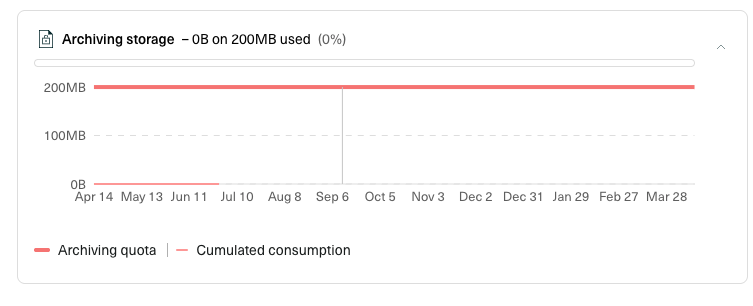
Track archives consumption
You can track the consumption on your account, and in particular the volume of archived files (in Mo), from your consumption dashboard.
This consumption overview is available for sandbox and production environments.
Download an archived file
Your archived files are only accessible through the Youtrust API. There is no graphical user interface available to consult them.
However, you can retrieve an archived file through the API, using the id received in the response payload when archiving the file. The endpoint details can be found here.
Use Archiving in Sandbox
You can test the Archiving feature in Sandbox. However, the files won’t be actually stored in the digital safe of our third-party provider.
Updated 14 days ago