

Managing Webhook Subscriptions
On this page, you will learn how to create webhook subscriptions by setting triggering rules and defining key attributes like endpoint URL, secret key, and subscribed events. This guide also covers event types, environments, and how to manage subscriptions for different workspaces.
To receive webhook notifications from Youtrust, you need to create a webhook subscription. This subscription defines which events you’re interested in, where to send notifications, and how the delivery should behave.
Subscriptions can be created from the Youtrust App or directly via our API.
Webhook Subscription Quotas by Plan
- PLUS plan: Up to 10 webhook subscriptions
- PRO plan: Up to 20 webhook subscriptions
- SCALE plan: Up to 50 webhook subscriptions
🛠️ How to Create a Webhook Subscription
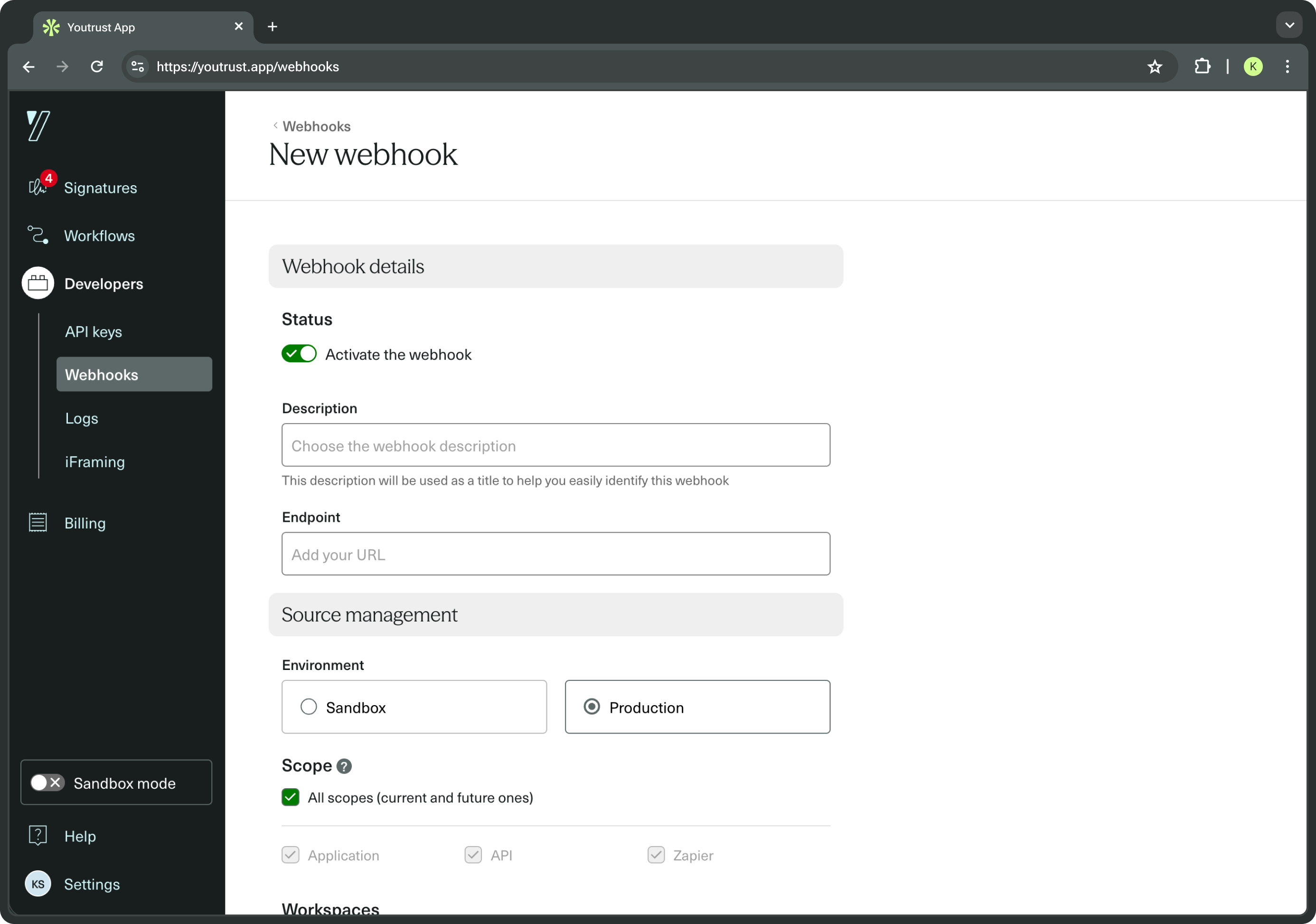
From the Youtrust App
- Log in and go to API > Webhooks.
- Click on Create a webhook.
- Fill in the required fields:
- Endpoint URL – must be HTTPS and publicly accessible.
- Description (optional) – short text for internal clarity.
- Environment – choose between sandbox or production.
- Subscribed events – choose one or more events (e.g. signature_request.done).
- Click Create a webhook.
Once saved, Youtrust will notify your endpoint every time one of the selected events occurs.
From the API
You can also create and manage webhook subscriptions programmatically, thanks to our dedicated endpoints.
Refer to the API Reference for details.
⚙️ Webhook Subscription Attributes
Each subscription includes the following configuration options:
| Attribute | Description |
|---|---|
endpoint | The HTTPS URL that will receive webhook POST requests. It must be publicly accessible and may include a specified port. |
secret_key | Used to sign payloads for authenticity verification. |
subscribed_events | List of events you want to listen to (see Event List). Use the wildcard *to subscribe to all events that exist at the time of creation or update. |
description | Optional description of this subscription. |
sandbox | Whether to receive events from the sandbox or production environment. |
enabled | Whether the subscription is active. |
auto_retry | Whether failed deliveries should be retried. |
scope | Determines which channel created the event (e.g. public_api, app).Use the wildcard *to subscribe to all scopes (existing and future). |
workspace | Limits delivery to events from specific workspaces. Use the wildcard *to subscribe to all Workspaces (existing and future). |
Sandbox vs. Production
| Environment | Use Case |
|---|---|
| Sandbox | Ideal for development and testing. |
| Production | Used for live integrations. |
Note: If your API account is in trial mode, you can only create subscriptions in the sandbox environment—and only through the App.
Learn more about environments in our dedicated guide.
Scopes
Scopes indicate where a resource was created. This can help you target webhooks based on their origin.
Common scopes:
app– created from the Youtrust Apppublic_api– created through the API
Consult our API reference for the complete list of scopes.
You can also use the wildcard * to subscribe to all scopes.
Workspaces
If your Youtrust account uses multiple workspaces (e.g. by team, department, or region), you can restrict a webhook subscription to trigger only on specific ones.
- Define one or more workspace IDs in your subscription payload.
- Use
*to subscribe to all current and future workspaces.
✏️ Updating or Deleting a Subscription
You can update or delete a webhook subscription:
- Via the App: Go to API > Webhooks, click the three dots on the right, and choose Edit or Delete.
- Via the API: Use the corresponding update/delete endpoints. Refer to the API Reference for details.
Updated 3 months ago