

Follow a Document Trust Analysis status
On this page, you will find comprehensive information about the Document Trust Analysis lifecycle
Orchestration principles
When calling Document Trust with multiple analysis_types, we consider that all the underlying processes have to successfully finish to move from the pending status to a final status.
When one of the underlying processes fails to yield a result, the final status will be inconclusive no matter if the other processes succeeded.
Document Trust Analysis statuses
The Document Trust Analysis lifecycle is really simple and consists of the following stages:
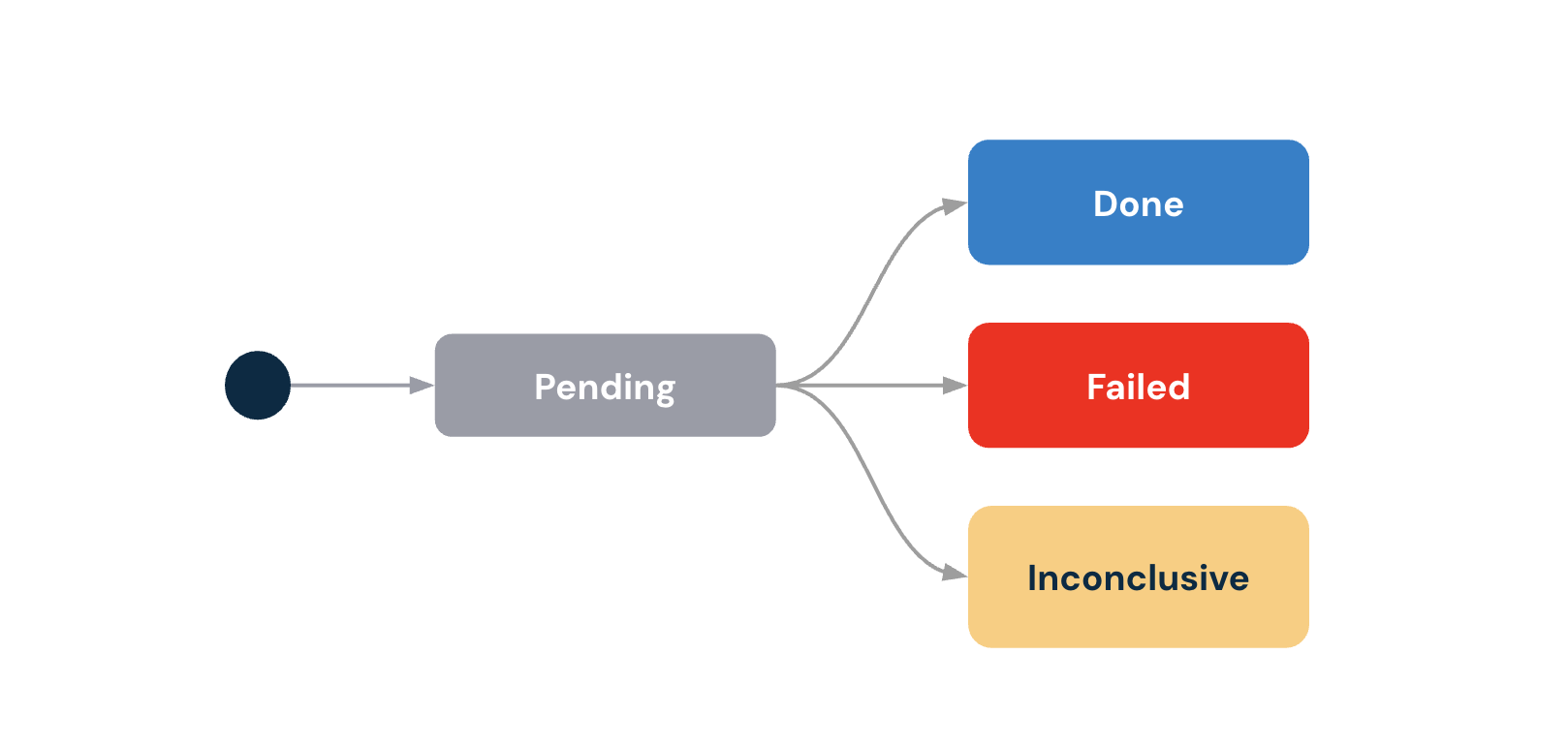
| Status | Description | Recommended action |
|---|---|---|
pending | The Document Trust Analysis has been initiated and all underlying processes were launched. | Wait for the status to change. |
inconclusive | One ore more underlying processes couldn’t yield a result , ie :
type status will always be failed. | Check the document_classification.document_type field and check the uploaded file to request a new file to extract data from or manually add the missing data from a manual inspection of the document. |
failed | All processes have successfully completed but some results indicate the need to review the document. For instance :
| Check the document or the input info and request a new Document Analysis. Manually review the document as we’ve identified a |
done | All processes completed successfully and no warning was raised. The status isdone, when
| Use the extract data to automate your process or reuse the extract data in another verification. |
To learn more on how names are matched and better understand a failed status please follow our detailed guide here.
BillingUnlike
doneandfailedstatus, aninconclusiveDocument Trust Analysis does not incur a charge.The current billing unit for Document Trust is 2 pages. This means that an upload of a document with 4 pages will actually count as 2 billable units.
On
tax_noticetype documents, you can upload a document up to 10 pages and it will still count as a single billable unit.
Status codes
If the Document Trust Analysis is failedor inconclusive the status codes can help diagnose the issue. A Document Analysis may include multiple reason codes.
STATUS: failed
Fraud Analysis related status codes
| Type | Code | Description |
|---|---|---|
| Suspicious document | DA_3001 | The risk level was either : High or Medium and requires additional attention or rejection. |
Document and Consistency check related status codes
| Code | Type | Description |
|---|---|---|
| DA_1001 | Check issue | This status code is still emitted alongside more specific check-failure codes (e.g. DA_2001, DA_2002) for backward compatibility. New integrations should rely on the specific codes. At least, the |
| DA_1002 | Document issue | The document is expired. Forcompany_certificates, business_registration_certificates we check that the document is at least 3 months old, on driver_licence we simply check that the expiration date. |
| DA_1003 | Document issue | The uploaded document didn't match the expected : type. Check the value in document_classification.document_type. |
| DA_1004 | Document issue | We couldn't recognize the type of document. |
| DA_1005 | Document issue | The document is not issued by the expected country. |
| DA_1100 | Provider error | Error on provider side |
| DA_1201 | Document issue | Image quality below minimum threshold |
| DA_1202 | Document issue | PDF document contains annotations |
| DA_1301 | Consistency issue | Holder first name not found in OCR |
| DA_1302 | Consistency issue | Holder last name not found in OCR |
| DA_1303 | Consistency issue | Holder first name initial(s) not found in OCR |
| DA_1304 | Consistency issue | 2D-Doc not found in document |
| DA_1401 | Suspicious document | PDF document contains tampering signs |
| DA_1402 | Suspicious document | 2D-Doc not signed with trustworthy certificate |
| DA_2301 | Consistency issue (tax notice) | Fiscal number not found in document |
| DA_1403 | Suspicious document | 2D-Doc and document type don't match |
| DA_2302 | Consistency issue (tax notice) | Tax notice reference not found in document |
| DA_2001 | Check issue | The full_name extracted from the document doesn’t match the declared information (ie: the match_level between the extracted and expected data was no_match). Read the full Name Matching Rules guide. |
| DA_2002 | Check issue | The income_year extracted from the document doesn’t match the declared information (ie: the match_level between the extracted and expected data was no_match). Read the full Name Matching Rules guide. |
| DA_2401 | Suspicious document (tax notice) | 2D-Doc income year does not match |
| DA_2402 | Suspicious document (tax notice) | 2D-Doc reference income does not match |
STATUS: inconclusive
| Code | Type | Description |
|---|---|---|
| DA_3003 | Document issue | We couldn’t process the document for fraud. |
| DA_3004 | Fraud Engine Issue | We encountered an unexpected issue on our fraud engine. |
Updated 22 days ago